


Setu by Navakalpaa Tech LLP
In development
Simplifying temple operations and devotee services.
Setu is temple management software in development from Navakalpaa Tech LLP. It is being built to help temples simplify everyday operations and deliver more convenient services to devotees.
The application
Screens from Setu.
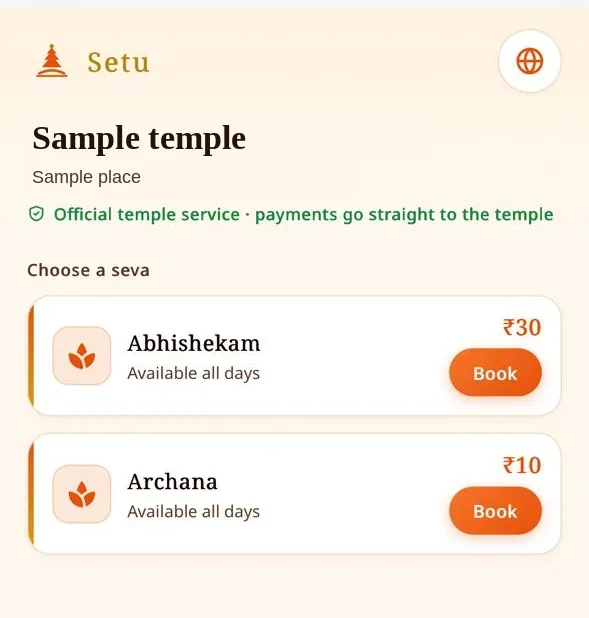
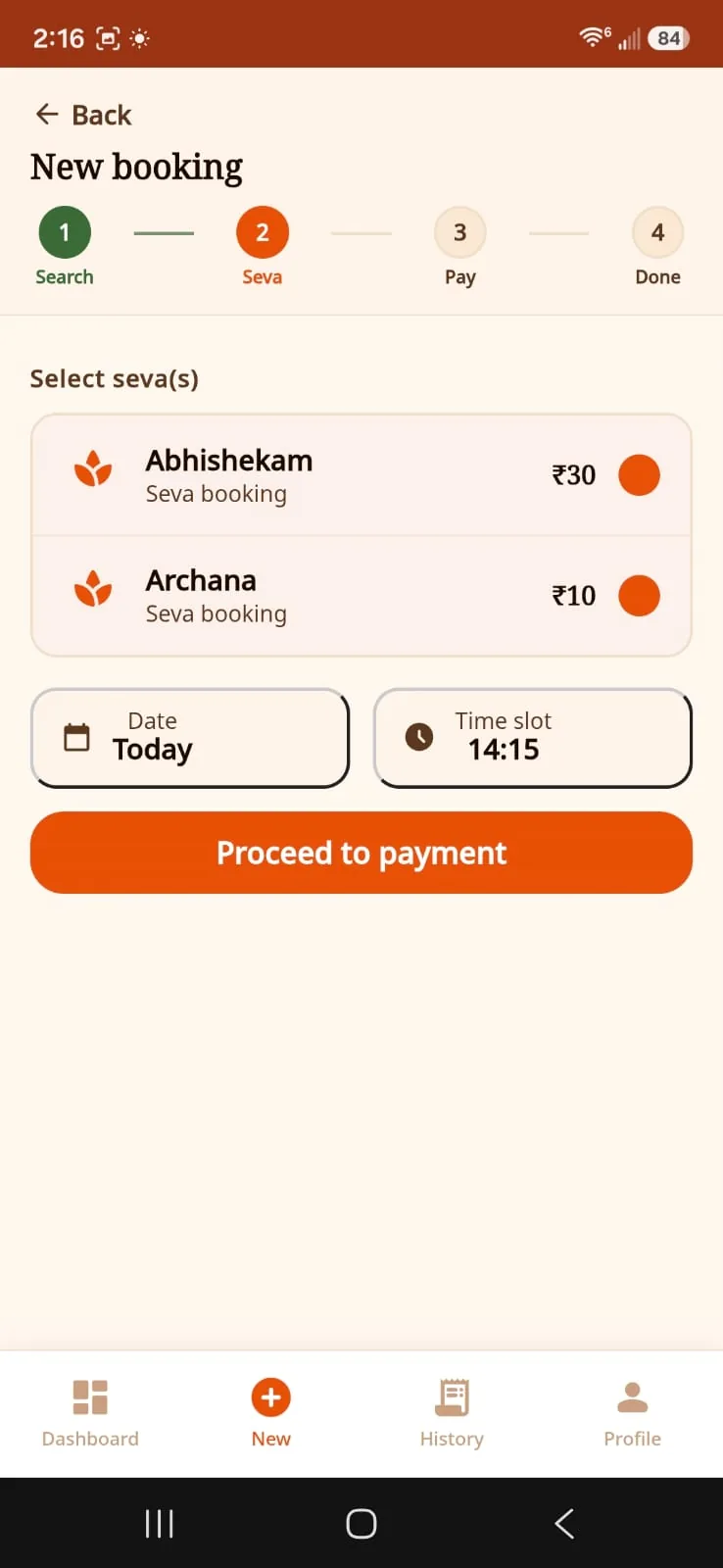
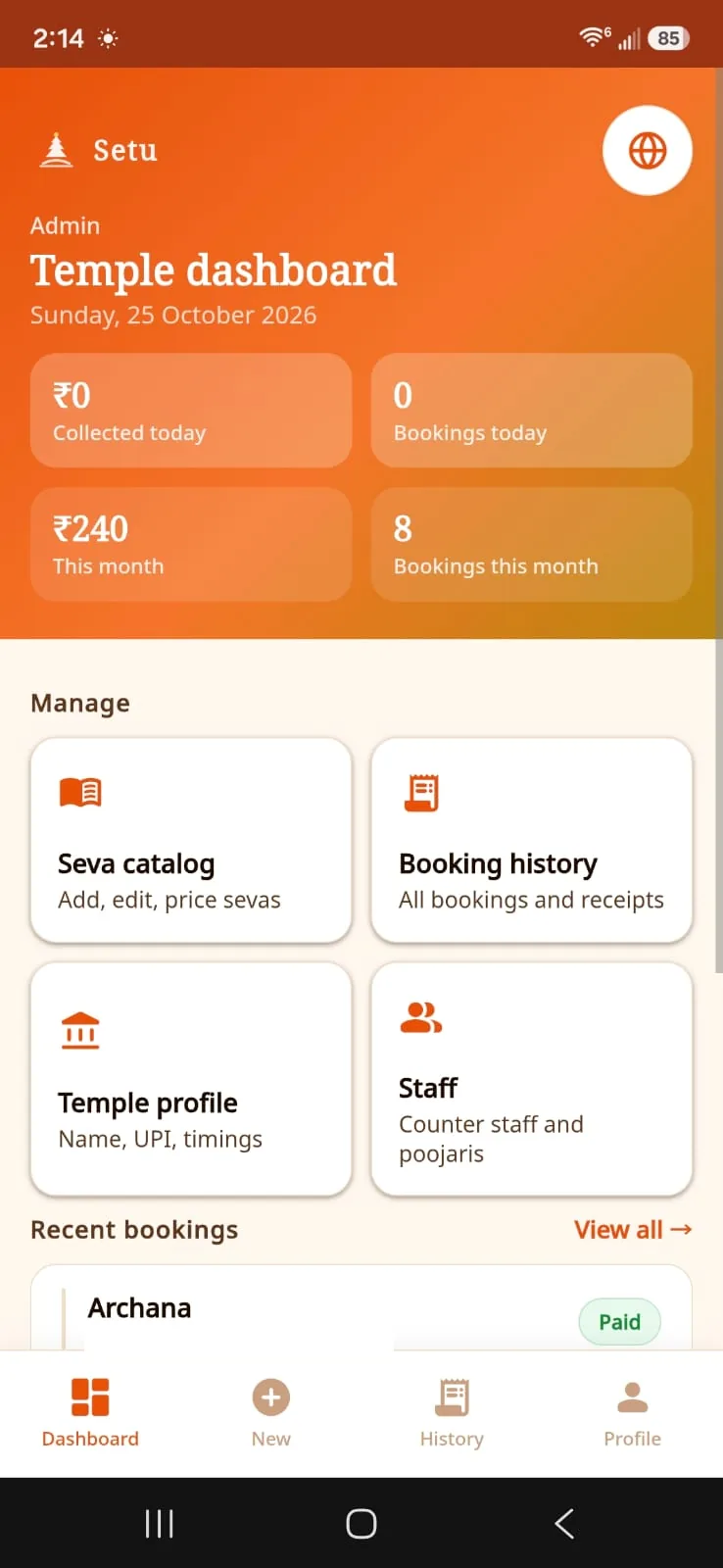
These screens are from Setu while it is in development: a sample public page, a staff booking, and the temple dashboard. The temple name and place on the public page are a depiction. Prices shown are sample seva prices, not a price for Setu. This website does not take bookings or payments.
The work
Everyday temple work these screens address.
Seeing the sevas
Devotees need a clear list of what a temple offers, with a price and a way to start.
Recording a booking
Staff need the chosen sevas, the date and the time together, and a payment step before the booking is finished.
Seeing the day
The temple needs one view of what was collected and booked, with the catalog, history, profile and staff close by.
What is on screen
What Setu shows.
The notes below describe only what is visible in the screens above.
A public page for devotees
The sample page has a place for the temple’s name and area. On this picture those words are a depiction. The page says it is an official temple service, and says payments go straight to the temple. Each seva shows a price, that it is available all days, and a Book button.
A booking for staff
A new booking moves through Search, Seva, Pay and Done. On the Seva step, staff select one or more sevas, set the date and a time slot, and proceed to payment. The same screen has Dashboard, New, History and Profile.
A dashboard for the temple
The admin view shows what was collected and how many bookings were made today and this month. A recent booking can be marked paid. From the same screen the temple opens the areas below.
- Seva catalog
- Add, edit and price sevas.
- Booking history
- All bookings and receipts.
- Temple profile
- The temple’s name, UPI and timings.
- Staff
- The temple’s counter staff and poojaris.
The staff area on the dashboard is for the temple’s own people. The picture shows that label. It is not a public service for booking a poojari.
Still being built
How a seva is meant to move.
Setu is in development. This is the path it is being built around. This website does not take a booking or a payment.
- 1
Scan
A devotee scans the temple’s QR code. Looking through the sevas does not need an app install.
- 2
Choose a seva
They see the sevas and prices, and pick a date and time when a slot is offered.
- 3
Sign in and pay
Sign-in uses a phone OTP. Payment is being built for cash at the counter and for UPI.
- 4
Ticket
A QR ticket is shown on the screen and is meant to be used once.
- 5
Counter
Staff can find a devotee, record a walk-in, confirm a payment, and scan the ticket.
- 6
Poojari
The poojari sees that day’s sevas and can mark one as performed.
Who it is for
Four roles inside the temple.
Setu is being built in Telugu and English, so the same screens can be read in either language. The poojari here is one of the temple’s own roles, not a person a visitor books from a public list.
Devotee
Browses sevas from the temple QR code, books, pays, and can look back at their bookings.
Counter staff
Finds a devotee by phone, records a walk-in, confirms cash or UPI, and scans tickets.
Temple admin
Keeps the temple profile, including its name, deity, address, UPI and timings, plus the seva catalog, prices and staff.
Poojari
Sees the day’s confirmed sevas and the devotee’s name and gotram for the sankalpa, then records that a seva was performed.
The company
Setu is a product of Navakalpaa Tech LLP.
Navakalpaa Tech LLP builds, launches and supports technology products, SaaS applications and software services. Its purpose is to simplify everyday problems through well-designed technology products.
Setu is the company’s first product, and it is still in development. It keeps its own name. This page is about that product only. Other products and organisations also use the name Setu. Navakalpaa does not claim them.
The screens are for three people already in the product: a devotee on the temple’s public page, a member of staff creating a booking, and an administrator on the temple dashboard.

Enquire
Ask us about Setu.
This page explains the product. It does not book a seva, take a payment, or open an account.
Our contact email address will be published on the contact page once it is confirmed.